Edit Allocations
Edit or post an allocation calculation session. You can only edit unposted sessions. Select a Session ID to open the session.
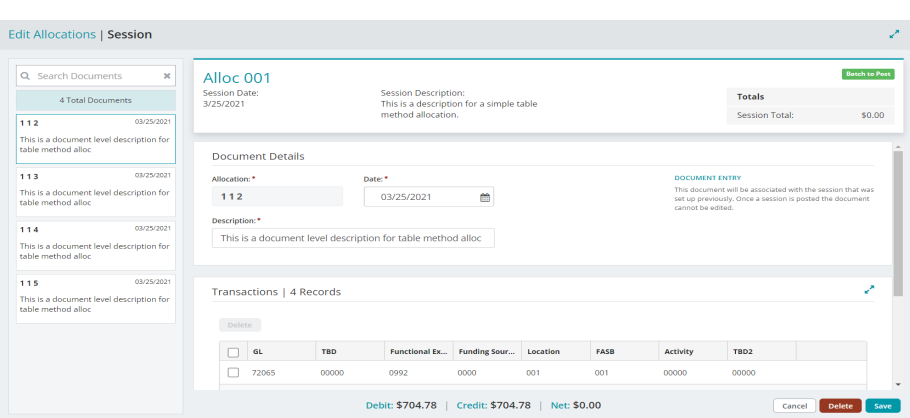
The "Edit Allocations" page displays document-level details of the allocation calculation session.
You can make edits to the Date, Description, and individual transaction entries displayed in the grid.
After entering your adjustments, Save your changes.

To edit the status of the session ("Batch to Post" or "Batch to Suspend"), select the allocation ID at the top of the form.

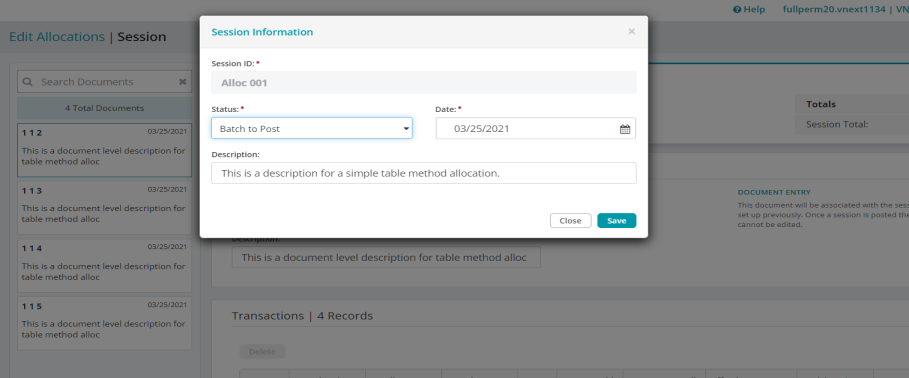
Select the allocation ID to change the session status - a window will appear for you to make the change.
Posting an allocation calculation session
If you've already processed a calculation, you can post the session from the "Edit Allocations" page.
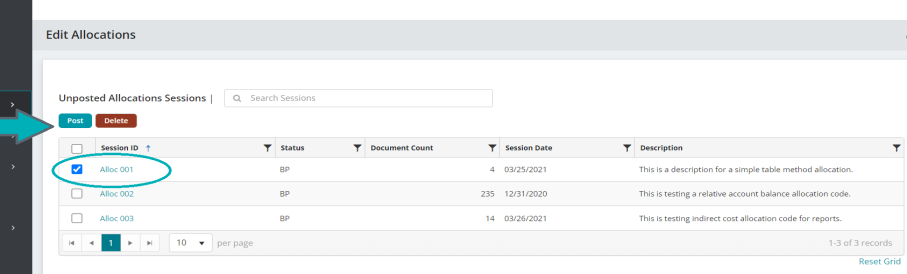
Consider the following when working with the Edit Allocations form:
When you processed the allocations, transaction entries were automatically created with a transaction source code of JVA (Journal Vouchers Allocation Management).
You cannot add new documents to an existing unposted calculation, and you cannot change the Allocation number.