Select Processing Groups
Select processing groups to calculate payroll.
In order to process payroll, you must have entered at least one timesheet (regular or supplemental) through the Add Timesheets form, or have at least one default timesheet entered for an employee (see Default Timesheet).
Note: If you're going to process payroll using default timesheets, be sure to select the "Use Default Timesheet When No Other Timesheet Type is Entered for the Pay Date" checkbox in the Payroll Details section. This option is only available when you select the "Regular Timesheet" option.
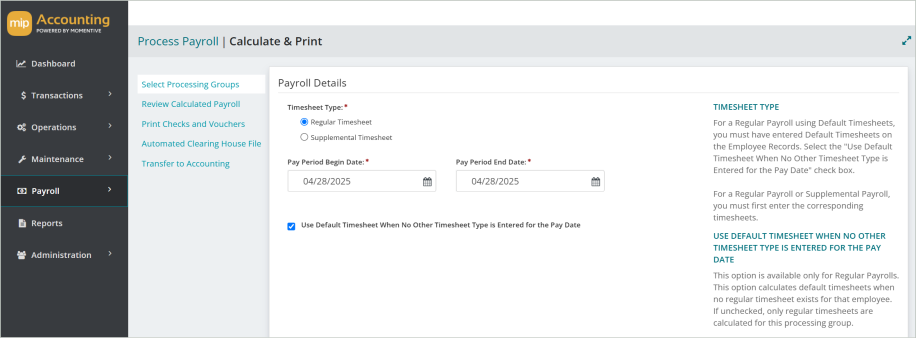
Payroll Details
Timesheet Type: Select either "Regular" or "Supplemental" to indicate the type of payroll you want to calculate.
Pay Period Begin and End Date: Enter the date range for the calculated payroll, if necessary. This date range defaults to a "Begin" date of 14 days prior to the current system date, while the "End" date is 14 days after. This range can be modified to include pay dates which fall outside the default date range.
Use Default Timesheet When No Other Timesheet Type is Entered for the Pay Date: This option is available only for Regular Payrolls. Select this box to use any Default Timesheets that have been entered for employees. This option causes default timesheets in the selected processing groups to be calculated when no regular timesheet exists for that employee. If unchecked, only regular timesheets are calculated for this processing group (see Add Timesheets).
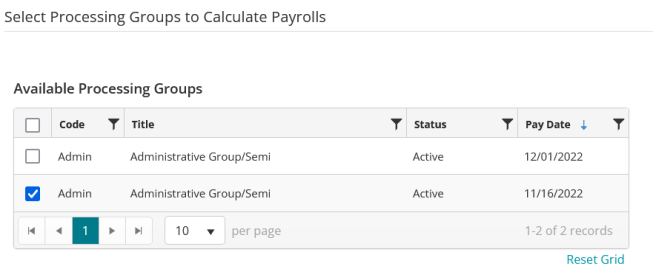
Select Processing Groups to Calculate Payrolls
Select the processing group to process payroll for.
When you're finished making your selections, select Calculate. Then proceed to Review Calculated Payroll.
FAQs
 I want to calculate payroll for a mix of employees, some who use default timesheets and some that I entered timesheets for. How do I calculate for both groups of employees in one payroll?
Suppose you calculate a Regular Payroll for a processing group that includes some employees for which you must enter timesheets and some employees for which the system uses Default Timesheets. If you forget to check the "Use Default Timesheet When No Other Timesheet Type is Entered for the Pay Date" box before you calculate payroll, the system will not calculate payroll for the employees that have Default Timesheets. Therefore, the payroll calculation will be incomplete.
To remedy the situation, calculate the same payroll again, making sure to select the "Use Default Timesheet When No Other Timesheet Type is Entered" for the Pay Date box. The system only calculates payroll for those employees that have Default Timesheets because the other employees have already been calculated. The new calculations are added to the Calculated Payroll file, and when pay checks are printed, all of the employees are included.
Why isn't my processing group appearing in the table?
The "Available Processing Groups" table only displays processing groups that have a pay date that falls within the Pay Period Begin and Pay Period End dates. Change the dates in these fields to include the pay date for the processing group you are looking for. To review your processing group pay schedule, go to Payroll > System Setup > Payroll Codes > Processing Groups (for more information, see Processing Groups).