What's New
See all release updates in MIP - including new features, enhancements, and key fixes across both Modern and Classic.
-
MIP Version 2026.4
Sept 25, 2026
Enhancements & Updates
Purchase Orders Module
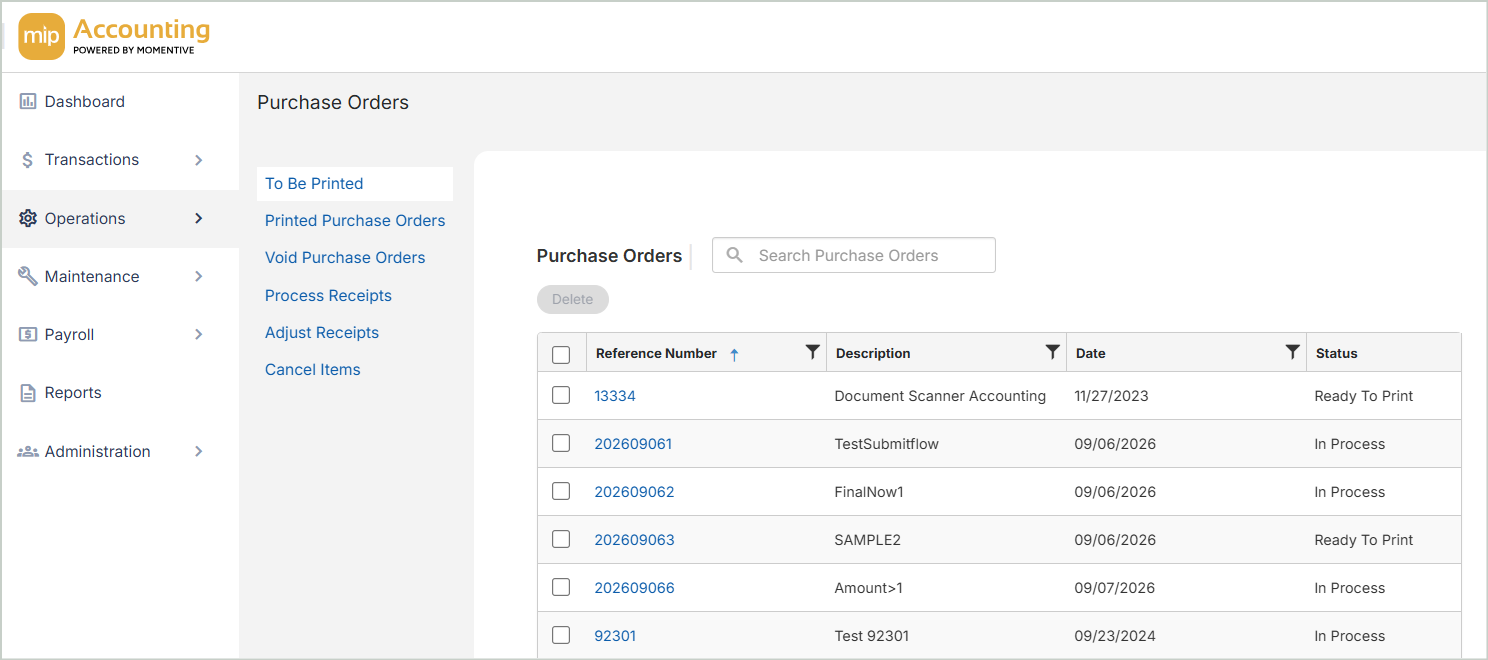
The Purchase Orders Module is now available in MIP Modern. You can create and manage purchase orders from initial entry through receiving and final invoice match - without switching back to Classic to do it. The Choose Items/Encumbrances form is now in Modern too. Use it to pull open PO line items and encumbrances directly into AP Invoices, Write Checks, and Cash Disbursements.
New Automated Workflow Approvals Module
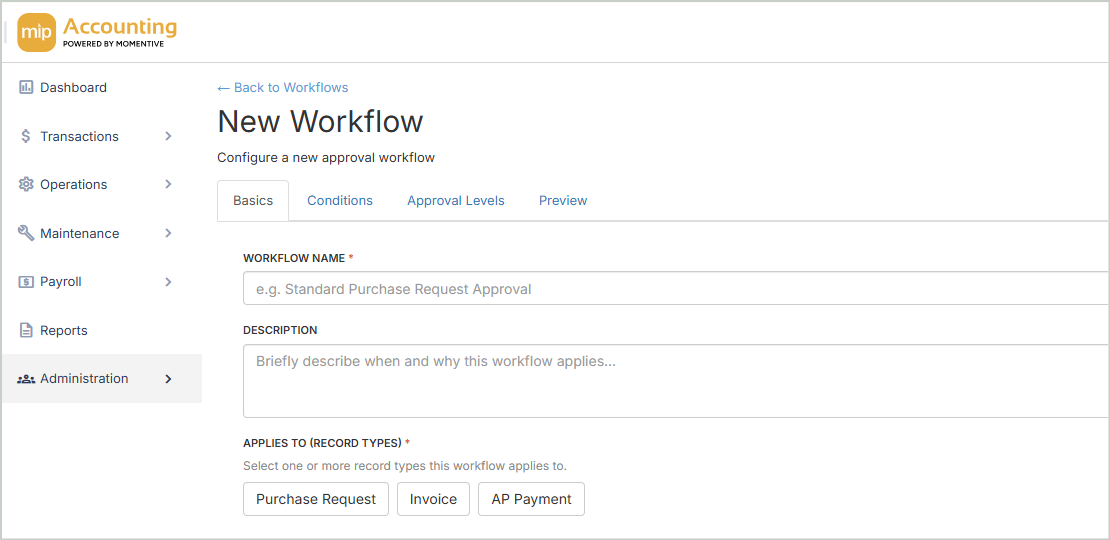
Set up Automated Workflow Approvals for payments, invoices, and purchase orders, plus proof of payment/remittance advice for a stronger audit trail across every transaction.
Note: This new module will be available as a separately licensed add-on and requires purchase to access and use its features. Bundle options will also be available for organizations looking to experience a native, end-to-end purchasing cycle inside MIP Modern.
Drilldown Enhancements
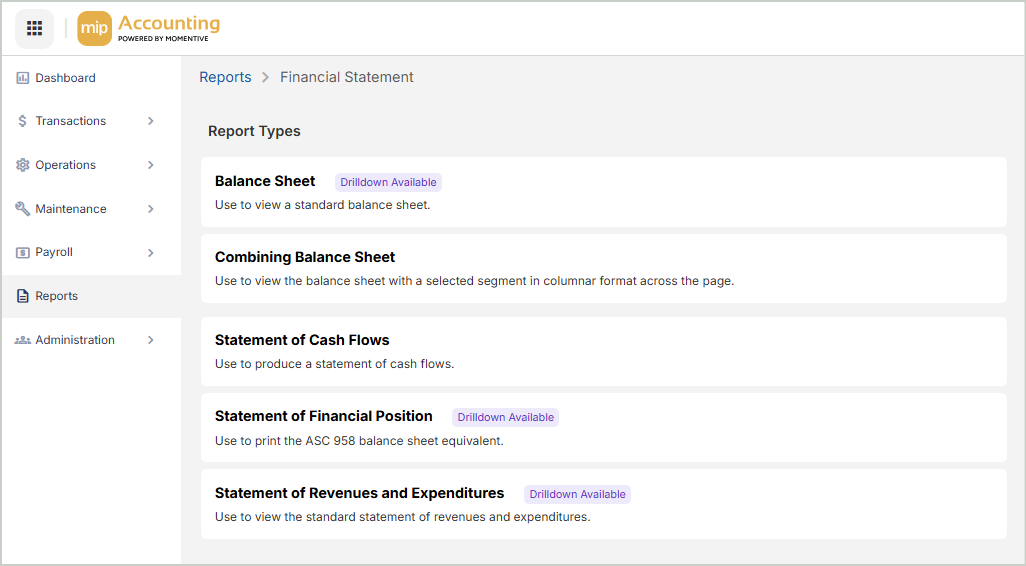
We've expanded our drilldown feature to cover more report types, including:
Financial Statements
-
Statement of Activities
-
Statement of Revenues & Expenditures by Period
-
Combining Statement of Revenues & Expenditures
Allocation Management
-
Pre-Allocation Normal Trial Balance
You can also now download multiple attachments from a document at once. Open a document from any drilldown view, select the attachments you need, and download them as a single .zip file. Each file is renamed with its transaction type, session, and document ID so you can identify them without opening each one.
State Tax Withholding Updates
Payroll withholding calculations have been updated for three states.
-
Arkansas - Tax rates decreased, the standard deduction increased, and brackets were updated.
-
Georgia - The flat rate decreased from 5.19% to 4.99%. The Standard Deductions and Dependent Allowance values increased.
-
Ohio - Rates decrease for all brackets. The Exemption value remains unchanged.
Quality Improvements
This release includes the following fixes and improvements based on reported issues and customer feedback.
Product Area Description Defect Resolved In Accounts Payable
Posting an APS session no longer fails with a 'Posting process has failed' error.
DF-FA-030940 - 'Posting process has failed' when attempting to post an APS session
Classic / Modern
Accounts Payable
Creating documents in Corpay no longer results in an internal processing error. DF-007034 - Internal error while processing document creation in Corpay
Modern
Administration
Dashboards now load as expected.
DF-004827 - Unable to load Dashboards
Modern
Administration
Accessing Advanced Organization Audit no longer produces an out-of-memory error for large organizations.
DF-FA-030957 - OutOfMemoryException when accessing Advanced Organization Audit
Classic / Modern
Administration
On-prem and ST clients who previously enabled Maintenance Mode no longer see a maintenance mode message after upgrading to 2026.3.
DF-FA-INC-008004 - ST and On-prem clients receive maintenance mode message after upgrade to 2026.3
Classic / Modern
Administration
New users can now activate their account from the Welcome email without a "User is disabled" error.
DF-031004 - New user unable to activate account with Welcome Email
Modern
General Ledger
Clients can now close the fiscal year and create UDFs without encountering an error.
DF-007698 - Unable to close the fiscal year or create a UDF
Classic / Modern
General Ledger
Posting a session no longer creates duplicate documents.
DF-030343 - Session posted duplicate documents
Classic / Modern
General Ledger
Posting a session in MIP Modern no longer hangs and blocks other processes.
DF-007080 - MIP spins after attempting to post a session in Modern causing all processes to be blocked
Modern
General Ledger
Allocations now process instead of staying in "Undefined" status.
DF-004920 - Unable to process allocations, stays 'Undefined'
Modern
Reporting
Column headers on the Revenue and Expenditure Report now align correctly with their columns when exported to PDF in MIP Cloud.
DF-006499 - Column Headers on Revenue and Expenditure Report not aligned (MIP Cloud)
Modern
Reporting
Drill down no longer errors when fetching Level 3 report data filtered by UDF or Grant Administration data.
DF-005414 - Drilldown error fetching report Level 3 data when filtering by UDF or Grant Administration data
Modern Reporting
Exporting the 12-month Expanded GL no longer fails with a "Job was not able to be executed" error.
DF-004901 - Error when exporting 12 month Expanded GL
Modern
Reporting
The Pay Code History report now runs without an error.
DF-031054 - Pay Code history report generating error
Classic / Modern
-
MIP Version 2026.3.1
July 10, 2026
Quality Improvements
This release includes the following fixes and improvements based on reported issues and customer feedback.
Product Area Description Defect Resolved In Administration
You can now log in to MIP Modern and the User Portal as expected without receiving an "Account is disabled" message.
DF-007148 - MT user is disabled and getting "Account is disabled" message when only logging into Modern at login.mip.com and Portal at portal.mip.com
Modern / User Portal
Administration
When all license seats are in use, you'll be notified that all seats are taken when trying to login to MIP Modern.
DF-007608 - Error message about server being in Maintenance Mode incorrectly displaying when all seats are in use
Modern
Administration
Password resets through email and the User Portal now work correctly. Portal admins can now enable user accounts as expected.
DF-007583 - Unable to Reset Password after 26.3 Portal Upgrade – MIP Cloud
DF-007632 - Customer portal 'password reset' sets expiration date (MIP Portal)
DF-007595 - Portal Admin Unable to Re-enable a user after 26.3 Upgrade
User Portal
Administration
User Portal administrators can now save User Manager or Executive View settings as expected.
DF-007597 - Unable to save User Manager setting after 26.3 Portal Upgrade – Multitenant
DF-007599 - Unable to save changes to Executive View user setting after 26.3 Portal Upgrade – Multitenant
User Portal
Administration
Setting up a new MFA device from the Multifactor Authentication Setup email now completes successfully.
DF-007607 - MFA New Device Setup fails with "Oops… Unable to Authenticate" after selecting Start Setup
User Portal
-
MIP Version 2026.3
June 26, 2026
Enhancements & Updates
This release includes design updates, security enhancements, and usability improvements across MIP.
New Login Page Design - MIP Modern & User Portal
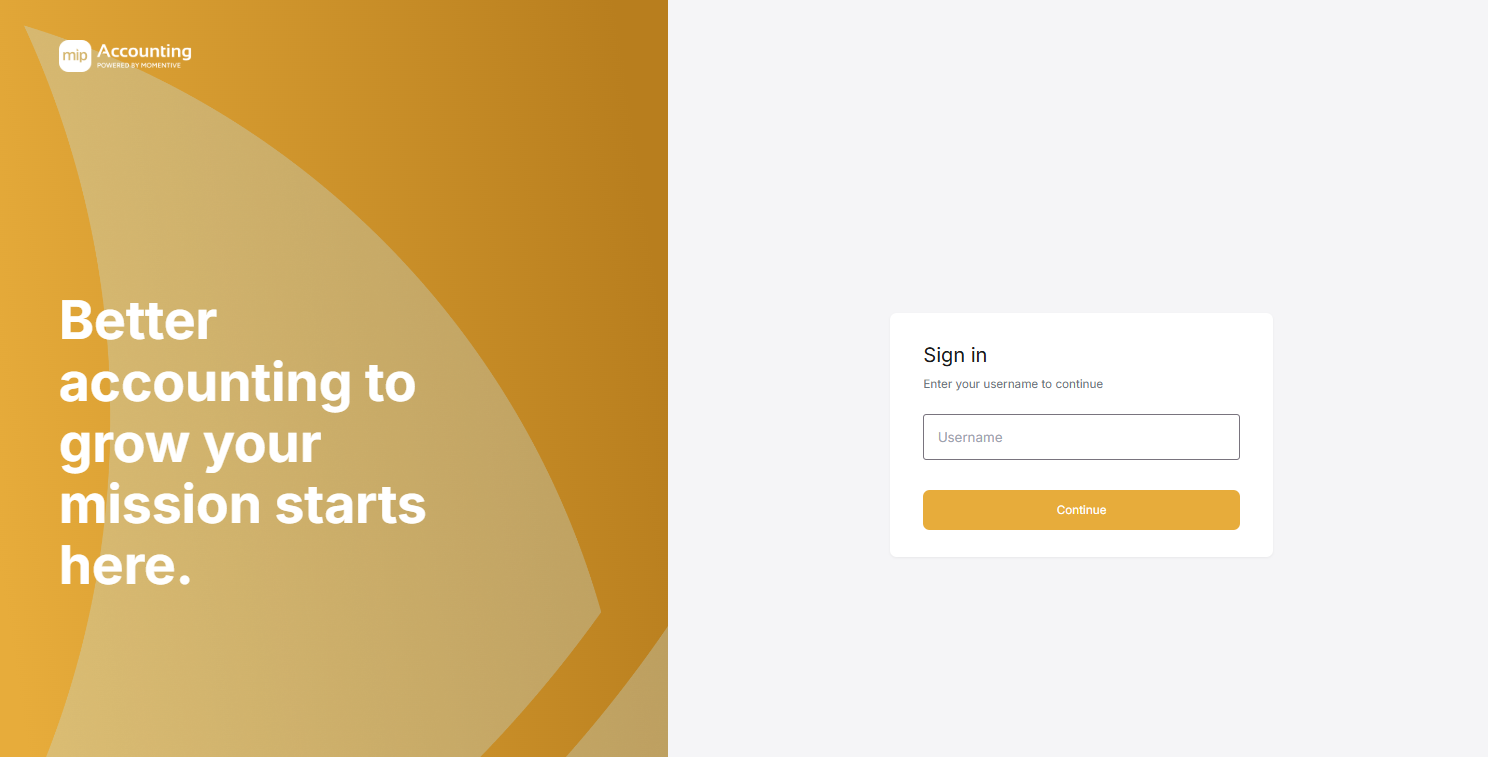
The MIP Modern & User Portal login pages have been refreshed with an updated design and gold-toned color scheme. This is a visual update only - there are no changes to how you sign in or access either system.
You'll continue using your existing login URLs and sign-in credentials:
-
MIP: login.mip.com
-
User Portal: portal.mip.com
State Tax Withholding Updates
-
Georgia - Updated withholding calculations so that marital status B calculates a higher amount than status C.
-
Louisiana - Restored the ability to claim a full state tax exemption.
-
Marshall Islands - Added a new standard annual exemption amount of $8,320 to withholding calculations.
-
Mississippi - Added a new “Exemption Total” field that matches the withholding statement to streamline the setup process.
-
Utah - Increased the Base Allowance and decreased the withholding rate from 4.5 to 4.45%.
Maintenance Mode (replaces Single User Mode)
Maintenance Mode has replaced Single User Mode for operations that require exclusive database access, including updating UDFs and closing the fiscal year. See Maintenance Mode for more information.
Removal of Resource Center
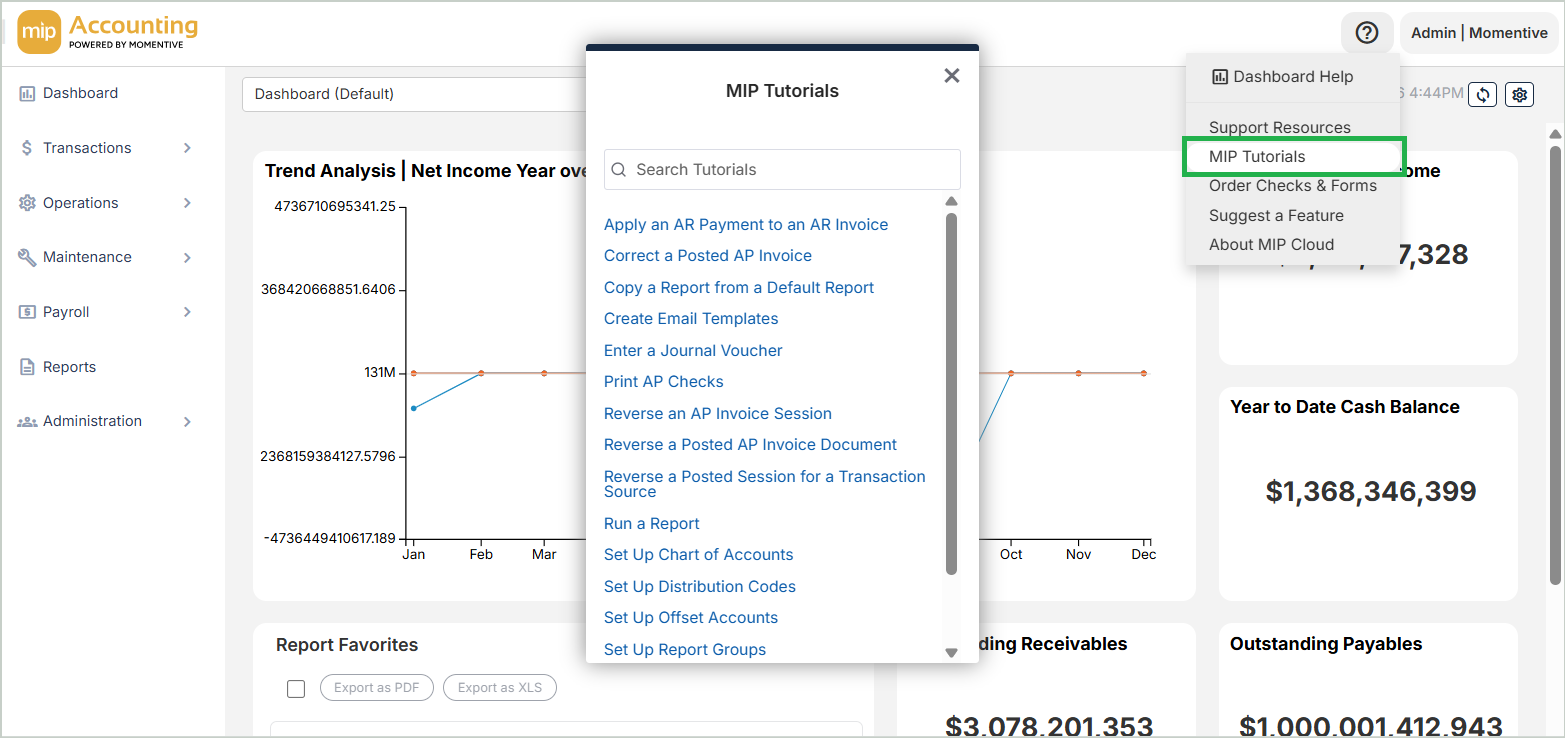
The Resource Center (the blue sails icon in the lower-left corner of MIP) has been removed. MIP Tutorials, previously available in the Resource Center, are now accessible through the help menu in the upper-right corner of MIP.
Removal of 9-Dot Menu
The 9-dot product navigation menu in the upper-left corner of MIP has been removed. An updated experience for navigating between Momentive Software products is planned as part of future enhancements.
Quality Improvements
This release includes the following fixes and improvements based on reported issues and customer feedback.
Product Area Description Defect Resolved In Account Management When resetting your password through the “Forgot password?” link in MIP Modern or the User Portal, an expiration date is no longer set on the user account. DF-031126 - Customer portal ‘password reset’ sets expiration date (MIP Portal) Modern / User Portal Account Management When resetting your password through the “Forgot password?” link in MIP Modern or the User Portal, password reset emails now come from noreply@momentivesoftware.com. DF-006327 - Change the forgot password email domain from noreply@communitybrands.com to noreply@momentivesoftware.com Modern / User Portal Accounts Payable When working in Vendor Balances, Accounts Payable Manual (APM) transactions selected in an APS Corpay payment now correctly display balances, effective dates, and DF-005004 - Balance on APM doubles when applied to a payment using Corpay Modern Accounts Payable You can now make partial payments as expected without encountering an error message. DF-005622 - Unable to make partial payments (MIP Classic) Classic Bank Reconciliation You can now save changes in Bank Reconciliation as expected without receiving an error message. DF-004996 - Error when saving changes to Bank Reconciliation - We apologize for the inconvenience; something had gone wrong on our end (MIP Modern) Modern Fixed Assets The Summary Asset Ledger report now correctly excludes disposed depreciation from Beginning and Ending Accumulated Depreciation for partially disposed assets. DF-031081 - Summary Asset Ledger Including Disposed Depreciation in the Beginning and Ending Accumulated Depreciation for Assets with Partial Disposals (MIP Classic/Modern) Classic / Modern Fixed Assets The Summary Asset Ledger report now correctly calculates values for assets with external depreciation in a closed fiscal year, ensuring accurate Accumulated Depreciation and Net Book Value. DF-006733- Amounts incorrect on Summary asset ledger for assets with External Depreciation in closed fiscal year MIP Modern/Classic Classic / Modern Fixed Assets The Summary Asset Ledger report now correctly displays a Net Book Value of zero for fully depreciated assets with a partial disposal. DF-005173 - Net Book Value on the Summary Asset Ledger displays amount of a partial disposal Classic / Modern Fixed Assets When copying an asset, External System Depreciation and Historical Information from the original asset are now not carried over to the new asset. DF-005789 - Using the Copy Feature in Fixed assets results in Erroneous External Depreciation (MIP Classic/ Cloud) Classic / Modern State Taxes Updated withholding calculations so that marital status B calculates a higher amount than status C. DF-006284 - Georgia State Withholding Tax Marial Status B and Marital Status C calculate the same, where Status C should be less than Status B Classic / Modern State Taxes Restored the ability to claim a full state tax exemption. DF-005946 - Louisiana State Withholding Tax does not allow for exemptions, but the state requires employees to report subject wages even if the employee is exempt from taxes (MIP Classic/Cloud AND HR) Classic / Modern -
MIP Version 2026.2.1
March 27, 2026
Quality Improvements
This release includes the following fixes and improvements based on reported issues and customer feedback.
Product Area Description Defect Resolved In Fixed Assets Depreciation transfers now create accounting entries as expected. DF-005554 - Transfer of Depreciation does not create JVD entries but does update assets Classic / Modern Fixed Assets When running the Asset Transfer Register report after Depreciation has been transferred, the Depreciation Expense and Accumulated Depreciation now match as expected, as well as the amount posted to the General Ledger. DF-005891 - Asset Transfer Register has a discrepancy between Depreciation Expense and Accumulated Depreciation and does not tie to the amount posted in the JVD Classic / Modern -
MIP Version 2026.2
March 6, 2026
Enhancements & Updates
This release includes additional State Tax Updates.
State Tax Withholding Updates
-
Illinois - The Personal Exemption increased from $2,850 to $2,925. All other variables remain unchanged.
-
Kentucky - The Standard Deduction increased from $3,020 to $3,360. The flat withholding rate decreased from 4.0% to 3.5%.
-
Maryland - The Standard Deduction is now a flat value of $3,350 instead of a percentage of gross pay. New high earner brackets were added to all filing statuses, several local tax percentage tables were dropped and added, and several filing statuses had their table mapping changed.
-
Massachusetts - The High Earner Threshold increased from $1,053,750 to $1,107,750. All other variables remain unchanged.
-
Michigan - The Personal Exemption increased from $5,800 to $5,900. The flat withholding rate remains unchanged at 4.25%.
-
Montana - Brackets were adjusted and the highest bracket rate increased from 5.9% to 5.65% for filing statuses.
-
New Mexico - If an employee is fully exempt from New Mexico state tax withholding, enter 99 in the Exemptions field.
-
North Dakota - Brackets were indexed for inflation in both the pre-2020 and post-2020 W-4 workflows.
-
Oregon - All variables indexed upward for inflation. Formula structure and rates remain unchanged.
-
Vermont - Exemptions increased from $5,300 to $5,400, and brackets were adjusted for inflation.
Quality Improvements
This release includes the following fixes and improvements based on reported issues and customer feedback.
Product Area Description Defect Resolved In Accounts Payable ACH files now save successfully even if an email error occurs during the file creation process. DF-004770 - ACH file will not be saved if an email error occurs while attempting to create and save the file (MIP Modern) Modern Accounts Payable You can now enter a second line when entering a vendor address on the Vendor Record > Addresses tab > Address field. DF-030917 - There's no 2nd address line in the Vendor Addresses (MIP Modern) Modern Bank Reconciliation Suspense item totals in Bank Reconciliation summaries now display correctly. DF-026985 - Suspense Item Amount Showing in Summary List that are not In Reconciliation ID (MIP Modern) Modern Budget The Budget Worksheet Wizard now correctly generates budget worksheets when valid accounts exist, rather than indicating that 0 lines will be created. DF-020081 - Budget Worksheet will not create (MIP Classic/Modern) Classic / Modern Fixed Assets Asset disposals now transfer correctly to the General Ledger when included in the same summary transfer session as depreciation. DF-031137 - Disposals being Dropped from Asset Sessions Transferred in Summary with Depreciation (MIP Classic/Modern) Classic / Modern Fixed Assets Depreciation transfers now post correctly without generating duplicate entries in the Fixed Assets table or General Ledger. DF-031141 - Duplicate Amounts are Created in the FA Table and GL entries on Asset Transfer (MIP Classic/Modern) Classic / Modern Fixed Assets Regular depreciation now transfers correctly to the General Ledger when included in a summary transfer session with depreciation adjustments. DF-031138 - Depreciation being dropped in sessions that include adjustments and transfer in summary (MIP Classic/Modern) Classic / Modern Payroll Payroll-only distribution codes can now be modified and saved without generating an error. DF-030576 - Changing the coding of a Payroll Only distribution code results in error: “This distribution Code is being used in Accounting and cannot be reclassified” (MIP Modern) Modern Reporting Reports that use custom columns referencing other custom columns now generate results correctly instead of displaying a blank report. DF-030908 - Report that Uses a Custom Column in a Custom Column Returns Blank Report When Printed Classic / Modern User Portal Creating additional user groups in the User Portal now correctly advances the group number sequence. DF-031119-MIP Portal – Users & Groups. After the 16th Group is added, the Group number doesn’t advance to the next consecutive number. Classic / Modern -
-
MIP Version 2026.1.1
Jan 23, 2026
Enhancements & Updates
This release includes additional State Tax Updates.
State Tax Withholding Updates
-
Arkansas - The Standard Deduction increased, and brackets were indexed for inflation.
-
California - Under Exact Calculation Method B, all brackets and values were indexed upward for inflation.
-
Colorado - Default Allowances were indexed upward for inflation. The flat rate remains unchanged at 4.40%.
-
Louisiana - The emergency declaration was continued. Standard Deductions increased for all filing statuses, and the withholding rate remains unchanged at 3.09%.
-
Minnesota - Personal and Additional Exemption values increased from $5,200 to $5,300. Brackets were indexed for inflation.
-
Mississippi - The flat withholding rate decreased to 4%. All other variables remain unchanged.
-
Nebraska - Several bracket rates decreased, and brackets were indexed for inflation.
-
North Carolina - The flat withholding rate decreased to 4.09%. All other variables remain unchanged.
-
Rhode Island - The exemption phase-out threshold increased, and brackets were indexed for inflation.
-
-
MIP Version 2026.1
Jan 9, 2026
Enhancements & Updates
This release includes Federal & State Tax Updates.
Federal Tax Updates
-
FIT Withholding - Updated formula table values, including changes to the Nonresident Alien salary gross-up.
-
FUTA Withholding - Changed Override Official Value dates for FUTA Taxes as well as default Credit Reduction values for State Tax Codes.
-
FICA Withholding - Updated the Social Security base from $176,100 to $184,500. Revised Official Value dates and values for Federal Employee & Employer FICA taxes, and updated the Social Security tax calculation to reflect the new maximum annual subject wages.
-
W-2 Report Calculation Values - Updated setup values to reflect the 2025 FICA maximums.
-
Fair Labor Standards Act (FLSA) Overtime Premium Codes Reporting - Required for 2026 W-2 reporting and optional for the 2025 tax year.
State Tax Withholding Updates
-
Hawaii - The extra lump sum withholding allowance increased from $1,650 to $4,350. Brackets and rates for all filing statuses remain unchanged.
-
Indiana - Personal and Additional Exemption values remain unchanged at $1,000 and $1,500, respectively. The flat state income tax rate decreased from 3.00% to 2.95%.
-
Iowa - The Standard Deduction values for all filing statuses increased. The filing status descriptions were updated to reflect the rolling of the tax year. Rates remain unchanged.
-
Maine - Allowance, Standard Deduction and Standard Deduction phase-out values indexed upward for inflation. Brackets widened, and rates remain unchanged.
-
Missouri - Standard Deductions increased for all filing statuses. Brackets widened, and rates remain unchanged.
-
New Mexico - Brackets were indexed, and rates were adjusted for all filing statuses.
-
New York - Bracket values remain unchanged; however, the rates were updated for all filing statuses. High earner Method III brackets and rates remain unchanged.
-
Oklahoma - The annual individual exemption value is unchanged at $1,000. The number of withholding brackets for both Single and Married filing statuses decreased from 7 to 4.
-
South Carolina - Exemptions and the Standard Deduction increased. Brackets widened. The highest bracket rate decreased from 6.2% to 6.0%.
-
-
MIP Version 2025.5
Dec 12, 2025
Enhancements & Updates
This release includes style changes in Modern, Bank Reconciliation & Auto Payments enhancements, and several key improvements.
MIP Unified Look & Feel
The MIP Modern interface has fresh new look to create a more seamless, branded experience across all Momentive products. This update brings our colors, fonts, and layouts into alignment - so every tool in our suite feels familiar and connected. You’ll notice a cleaner style and smoother navigation as you move between products.
What’s Changed:
-
Updated color palette and fonts
-
Refreshed buttons, icons, and navigation
-
Consistent layouts and visual clarity
What Hasn't Changed:
Functionality remains the same - this update focuses purely on look and feel for a cohesive experience across products.

Bank Reconciliation - Filtering Enhancements
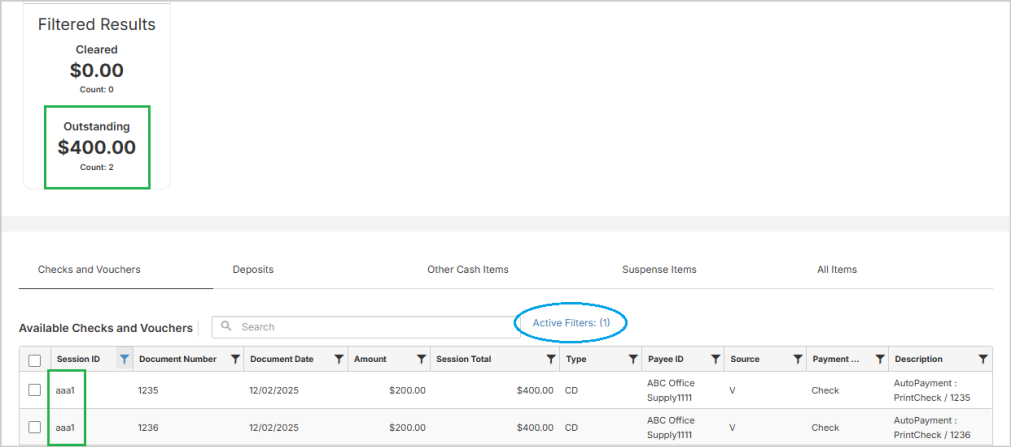
You can apply column filters when performing manual Bank Reconciliation to quickly isolate and clear specific checks, vouchers, or other items. When filters are applied, a new Filtered Results card displays the Outstanding total for only the items matching your filters, making it easy to clear exactly what you intend. This feature is available in the Checks and Vouchers and All Items tabs.
See How to Filter & Clear Items in Bank Reconciliation for a step-by-step walkthrough.
Auto Payments - Batch ID Now Available in Session Details
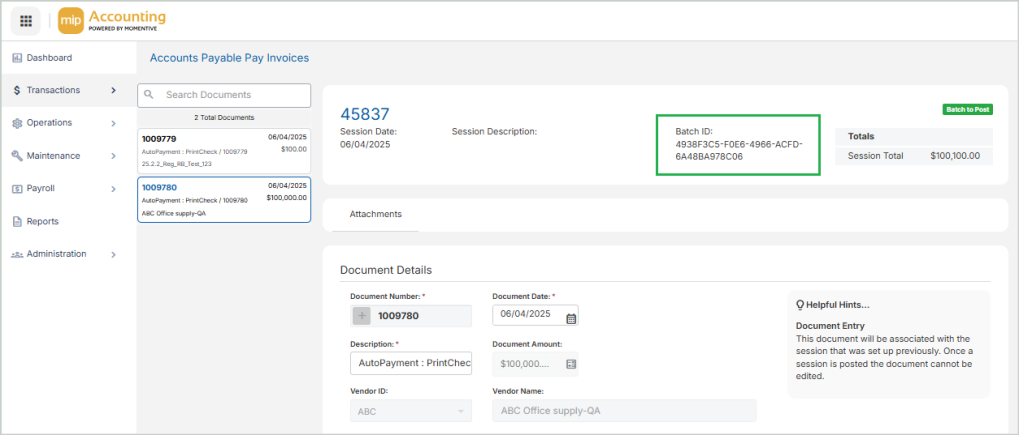
When submitting invoices for Auto Payment, a unique Payment Batch ID is automatically generated by Corpay. Previously, the Batch ID was only visible in the Unposted Sessions grid. This ID is now displayed directly within the session so you can easily reference payment activity.
The Batch ID is located at the top of the page:
Alerts in Classic
Alerts have been enabled for all hosted Classic clients. If you own this module and have configured Alerts, you'll receive notifications accordingly.
HR Version Update
Update to version 2025.5.
Quality Improvements
This release includes the following fixes and improvements based on reported issues and customer feedback.
Product Area Description Defect Resolved In Accounts Payable Submitting Auto Payments now functions as expected without producing an error message. DF-FA-031145 - Corpay Payment attempt results in ‘Internal Error has occurred while processing a documents creation’ Modern Accounts Payable Attachments added to an invoice created with a recalled document now save as expected. DF-FA-030548 - Attachments not saved on documents created with Recall Memorized Document in MIP Cloud Modern Alerts Alerts have been enabled for all hosted Classic clients. If you own this module and have configured Alerts, you'll receive notifications accordingly. DF-FA-030505 - Hosted Real-time Alerts: Alerts Server Needs to be Installed Classic Bank Reconciliation The Unreconciled Difference in Bank Reconciliation now displays the correct totals as expected. DF-FA-MIP Cloud Modern-030627 - Bank Rec Summary Information Incorrect Modern Bank Reconciliation Resolved an issue in Bank Reconciliation where EUR payments were incorrectly generating Exchange Adjustments. DF-FA-031085 - MIP Modern Populating an Exchange Adjustment in Bank Reconciliation Modern General Ledger When modifying a Journal Voucher after closing out of an AP Invoice entry screen, MIP no longer closes unexpectedly. DF-FA-030920 - MIP crashes when selecting a journal voucher Classic General Ledger Creating a reversal document in a Cash Disbursement session now saves correctly without producing an error message. DF-FA-031079 - Error when reversing CD Document in MIP Cloud - The execution of the method [ValidationPOENCLineTotals] has thrown an error. Modern Import You can now successfully import updates to vendor status through a DEF file without any other vendor information being affected. DF-FA-031032 - AP Vendor ‘update’ import removes vendor information Classic Login You can now log in to MIP Modern without encountering an error message. DF-FA-031021- Modern - Could not initialize MIP Classic subsystem: Log on user failed. Verify your credentials. Modern -
MIP Version 2025.4.2
Nov 8, 2025
Quality Improvements
This release includes the following fixes and improvements based on reported issues and customer feedback.
Product Area Description Defect Resolved In Reporting Reports now correctly display figures in the Credit column without parentheses. DF-FA-031125 - Trial Balance Credit column shows figures in parenthesis Classic / Modern -
MIP Version 2025.4.1
Oct 23, 2025
Enhancements & Updates
This release includes State Tax Updates and several quality improvements.
State Tax Withholding Updates
-
Missouri - Deductions increased for all filing statuses and brackets widened. Rates remain unchanged.
-
Ohio - Switched from the Percentage Method to the Optional Computer Formula Method.
-
West Virginia - Rates reduced for all brackets and filing statuses. Exemptions remain unchanged at $2,000 for both filing statuses. The number of brackets remains unchanged.
Quality Improvements
This release includes the following fixes and improvements based on reported issues and customer feedback.
Product Area Description Defect Resolved In State Taxes The Personal Exemption amount for Michigan has been corrected from $5,600 to $5,800. DF-FA-031112 - Michigan state withholding Classic / Modern Accounts Payable Submitting Auto Payments now functions as expected without producing an error message. DF-FA-031131 - Error when attempting to use MIP Payments to send file to Corpay Modern -
-
MIP Version 2025.4
Oct 10, 2025
Enhancements & Updates
This release includes State Tax Updates, Drilldown Reports in Modern, and several key improvements.
State Tax Withholding Updates
-
Ohio - The number of progressive brackets in the Percentage Method tables decreased from 6 to 3, and new reduced rates apply. The highest bracket tax rate decreased from 3.8% to 3.64%. Exemptions remain unchanged at $650.
Drilldown Reports
The Drilldown feature is now available in several reports. Drilldown is a reporting functionality that lets you move seamlessly from high-level report balances to the specific transactions that make them up. With a simple click, you drill into the details behind report values - such as transaction history, document information, and supporting attachments.
The first release of Drilldown includes the following reports:
Financial Statements
-
Balance Sheet
-
Statement of Financial Position
-
Statement of Revenues and Expenditures
General Ledger Analysis
-
Normal Trial Balance
Auto Payments - Ability to Submit Invoice and Credit Notes
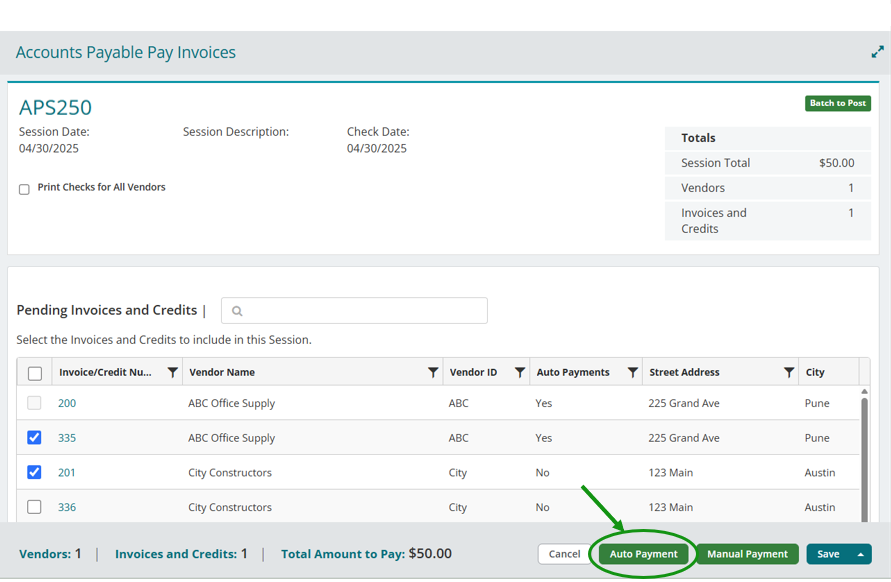
You can now apply invoices and credit notes together when submitting Auto Payments to Corpay.
What’s New:
-
Invoices and credit notes can be selected together for auto payment.
-
The system automatically offsets credits against invoices and calculates payments based on the vendor’s net payable amount.
-
Payments can only be submitted when the vendor’s net balance is positive.
-
If a vendor’s net payable is zero or negative, the system displays a pop-up message and excludes that vendor from auto payment.
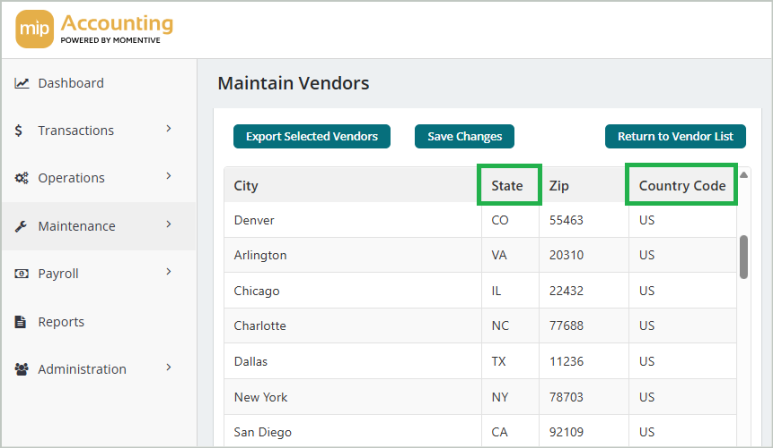
Auto Payments Vendor Export - US Country Code Update
We’ve updated how the US Country Code column is populated in the Auto Payments Vendor Export.
-
If a vendor record includes a valid US State/Province (e.g. "TX "or "NY"), the Country Code will now automatically be set to "US".
Reporting Update - Invoices Selected for Payment
We’ve added a new Payment Status column to the Accounts Payable > Invoices Selected for Payment Report. This provides greater visibility into the status of your invoice payments directly within the report (e.g. Submitted, In Process, Error, Paid).

Quality Improvements
This release includes the following fixes and improvements based on reported issues and customer feedback.
Product Area Description Defect Resolved In Accounts Payable Attachments added to an invoice with a recalled document now save correctly to the recalled invoice, rather than being linked to the original invoice. DF-FA-030558 - Attachments saved on the Original Document when document is memorized and Recalled in the same session Modern Accounts Payable Double clicking on an invoice now opens the Partial Payment form as expected (Activities > Accounts Payable > Select Invoices to Pay). DF-FA-031100 - Unable to complete partial payment on AP invoice with error ‘The invoice has been selected in another session.’ Classic Accounts Payable Printing a large check batch now functions as expected (Transactions > Accounts Payable > Pay Invoices). DF-FA-MIP Cloud Modern-030390 - Unable to print large AP check batch Modern Accounts Receivable All documents in an ARC session now post as expected regardless of the transaction source. DF-FA-MIP Cloud Modern-030960 - When posting ARC session that contains an ARP only the ARP is posted Modern Bank Reconciliation Bank Reconciliation items now retain their cleared status correctly, preventing unmatched withdrawals from being matched multiple times and ensuring totals display accurately. DF-FA-MIP Cloud Modern-030901 - Bank Rec items not retaining Cleared Status Modern Bank Reconciliation Suspense Items in Bank Reconciliation now carry forward correctly to the next month’s reconciliation, unless the prior reconciliation has been locked. DF-FA-030397 - Suspense Line Items are deleted after creating Bank Reconciliation ID for the next period Modern Bank Reconciliation Printing a Bank Reconciliation report now functions as expected, eliminating an error that previously appeared if the report was run before the reconciliation record had finished saving. DF-FA-MIP Cloud Modern-030439 - Bank Reconciliation - Repeatedly clicking on Run Report results in a warning message Modern Bank Reconciliation Bank Reconciliation now correctly retains the cleared status for all items, even when multiple items share the same document number. DF-FA-MIP Cloud Modern-030328 - Clearing multiple items with the same document number within the same bank rec will result in only one of those items remaining cleared Modern Bank Reconciliation Changes to Other Cash Items in Bank Reconciliation now save correctly, allowing items to be uncleared even after the reconciliation has been saved. DF-FA-MIP Cloud Modern-030934 - Unable to unclear ‘Other Cash Items’ in MIP Cloud after reconciliation has been saved Modern Bank Reconciliation Bank feed now correctly pulls in all matched and unmatched items from electronic bank statements, ensuring the full period’s data is reflected in Bank Reconciliation without requiring manual clearing. DF-FA-MIP Cloud Modern-030521 - Items missing from Bank Feed that are on Bank Statement Modern Bank Reconciliation Suspense Items in Bank Reconciliation now carry forward correctly and are no longer deleted when a new reconciliation ID is created for the same cash account. DF-FA-MIP Cloud Modern-030973 - Suspense Items Disappearing from Bank Rec when New Reconciliation ID is Create for Same Cash Account Modern Bank Reconciliation Cleared items under the ‘Checks and Vouchers’ tab in Bank Reconciliation now remain cleared after saving. DF-FA-031076-MIP Modern - Web User Interface - Unable to Clear Items in Bank Reconciliation Modern Email Setup Email setup with Microsoft 365 in Classic now operates as expected after upgrading to 2024.2, allowing test emails to send successfully without error messages. DF-FA-030915 - Microsoft 365 application is not setup Classic Transactions Resolved an issue where SQL blocking was occurring with MIP transactions. DF-MIP Portal-031080 - SQL Blocking Occurring with MIP Transactions Classic / Modern -
-
MIP Version 2025.3.1
Sept 5, 2025
Quality Improvements
This release includes the following fixes and improvements based on reported issues and customer feedback.
Product Area Description Defect Resolved In Fixed Assets Updating an asset with historical depreciation now retains historical values as expected. DF-FA-031073 - Depreciated Asset Loses Historical Data when it is updated Classic / Modern Fixed Assets Updating an asset with both historical and external depreciation now retains historical values without being overwritten by external depreciation. DF-FA-031074 - Depreciated Asset with External Depreciation Has Historical Data changed when asset is edited Classic / Modern Fixed Assets Assets with historical depreciation can now be updated without triggering an error message. DF-FA-031077 - Unable to Edit Assets that Have Taken Depreciation in MIP Modern Modern Usability When entering transactions, using the tab key now moves the cursor to the next field as expected. DF-FA-031066 - Cursor doesn’t move to the first field in the transaction line after completing the document header Classic -
MIP Version 2025.3
Aug 22, 2025
Enhancements & Updates
This release includes the launch of the Encumbrances module, Aatrix Web Forms, Fixed Assets updates, and several key improvements.
Design Improvements
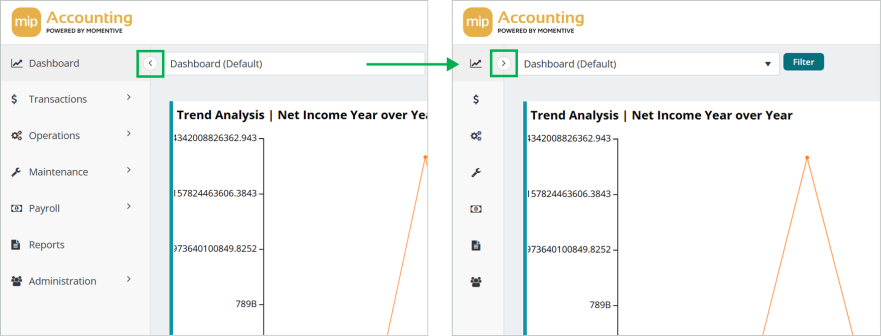
The MIP Modern interface now has a lighter design that aligns with other products across Momentive. The new interface features a collapsible navigation menu that allows you to free up valuable screen space. Simply click the arrow at the top of the menu to expand or collapse it.
Encumbrances Module in Modern
The Encumbrances module is now available in MIP Modern. Encumbrances give your organization real-time visibility into committed funds, enhancing budget control and helping prevent overspending. By reserving funds for planned expenditures, you can track obligations alongside actual expenses for more accurate financial reporting.
See the Encumbrances Module home page to get started. Watch our video overview of the Encumbrances workflow.

Aatrix Web Forms in Modern
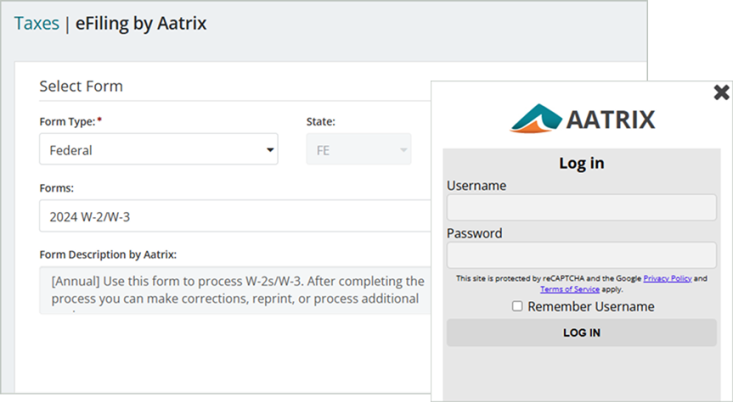
MIP Modern now integrates with Aatrix Web Forms, a software platform that streamlines the preparation and filing of tax documents. You can automatically generate forms from your accounting data in MIP, then use Aatrix to eFile your forms for a fee. Watch our video overview of the Aatrix workflow.
Note: If your organization uses Aatrix in Classic and would like to switch to Modern, you can continue using the same Aatrix eFile account. However, form data does not transfer between Classic and Modern. Forms started in Classic must be completed in Classic, and forms started in Modern must be completed in Modern.
Aatrix is available for the following modules. Select the help topics below to get started.
-
Accounts Payable - 1099-NECs and 1099-MISCs - Generate Vendor 1099s by Aatrix
-
Payroll - W-2s, W-3s, 940s, and 1094/1095s - Tax Forms & eFiling by Aatrix
Fixed Assets - Historical Depreciation Updates
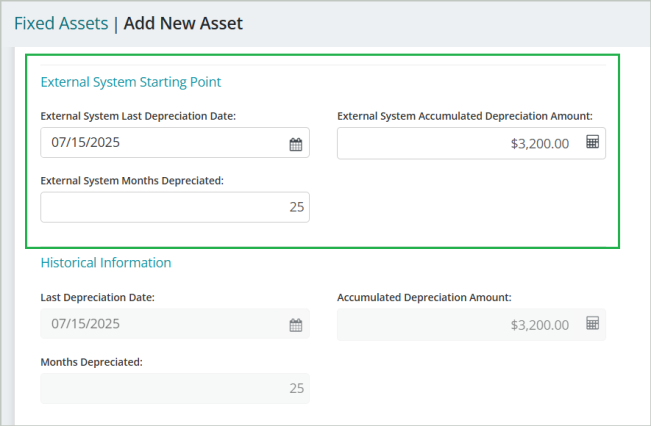
You can now capture external depreciation history when adding a new asset in MIP Classic & Modern. We've added three new fields under the Depreciation section that let you record the depreciation history of an asset from a system outside of MIP. The values entered in these fields automatically populate the Historical Information section (now read-only), ensuring that MIP accurately reflects the asset’s full depreciation history.
-
External System Last Depreciation Date
-
External System Accumulated Depreciation Amount
-
External System Months Depreciated
These fields are now included in the following Fixed Assets reports:
Automatically Notify Vendors of ACH Payments
You can now automatically send payment notification emails to vendors in MIP Modern when an ACH file is created. This functionality exists today in Classic and is now available in the Modern interface. In order to use this feature, you'll need to ensure that your organization’s setup is correctly configured in MIP.
See the ACH File help topic for instructions on setting up and enabling email notifications.
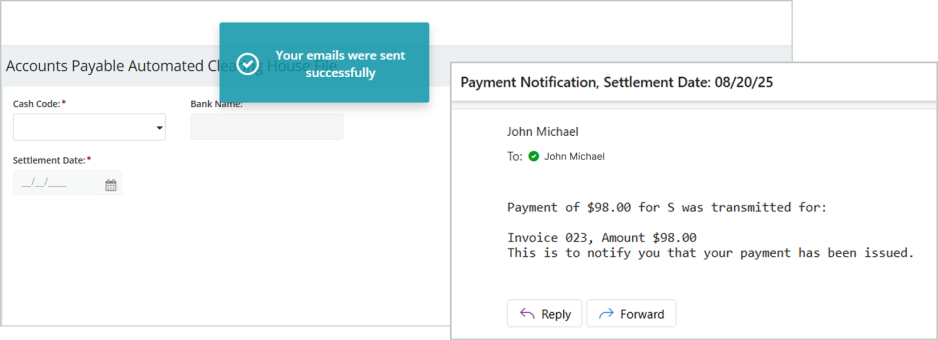
Ability to Delete Unposted Auto Pay Sessions
You can now delete unposted Auto Pay sessions in Modern. This gives you greater control to remove unused sessions or those with payment issues, helping maintain data accuracy between MIP and Corpay.
You can delete unposted sessions under the following conditions:
-
Unpaid sessions with no documents attached.
-
Sessions with an Error status, regardless of how many documents are still attached.

Reporting Updates - New Payment Columns
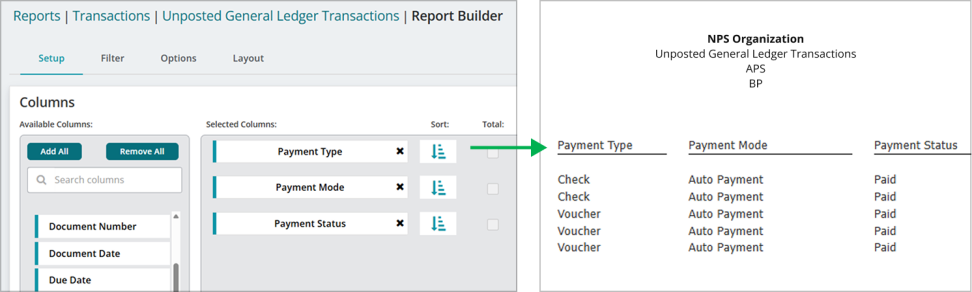
We've added new columns in several Transaction and Bank Reconciliation reports - Payment Type, Payment Mode, and Payment Status, and Session Amount. This makes it easier to understand how each transaction was paid and to filter and export payment-related details such as Check vs. Voucher, Manual vs. Auto Payment, and current payment status.
These columns are available in the following reports:
Transactions
-
Unposted General Ledger Transactions Report - Payment Type, Payment Mode, Payment Status
-
Posted General Ledger Transactions Report - Payment Type, Payment Mode
Bank Reconciliation
-
Checks/Vouchers Report - Payment Mode, Session Amount
-
Combined Reconciliation Report - Payment Mode, Session Amount
Bank Reconciliation - New Session Columns
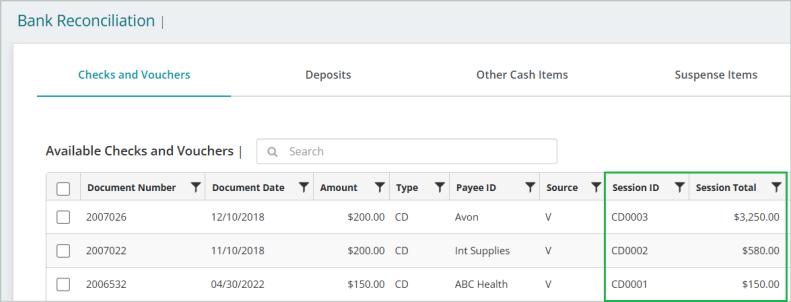
We’ve added two new columns to the Bank Reconciliation form - Session ID and Session Total. These columns are available in Modern under the Checks and Vouchers and All Items tabs so you can easily identify Auto Payment records across multiple sessions. These columns are also available in Classic under the Checks and Vouchers tab.
Tips and Shortcuts in MIP
Our Keyboard Shortcuts page provides a list of keyboard shortcuts that you can utilize when working in MIP. Refer to this page to learn how to speed up your workflow in both Classic and Modern.
Quality Improvements
This release includes the following fixes and improvements based on reported issues and customer feedback.
Product Area Description Defect Resolved In Accounts Payable When applying more than one encumbrance to an invoice in Vendor Balances, the Applied Amount now correctly matches the Original Amount. DF-FA-024861 - Applying more than one encumbrance to an API causes the Applied Amount in Vendor Balances to double Classic Administration Under Administration > User Preferences, when the ‘Copy from prior document’ option is selected for Vendor ID and Document Amount, the system now correctly copies from the previous document when entering invoices. DF-FA-MIP Cloud Modern-030536 - Entry Defaults Not Working as Expected. Modern Bank Feed Connections to financial institutions are now refreshing properly when information is received from Finicity / Mastercard. DF-FA-030588 - Bank Feed: Aggregation Issues do not show as Broken Connections Modern Bank Reconciliation When viewing the details of a deposit under the Deposit tab in Bank Reconciliation, you can now see all of the associated documents as expected. DF-FA-MIP Cloud Modern-030606 - Web User Interface - Selecting a Deposit in Bank Rec Produces No Results Modern Budget Worksheet Resolved an issue in the Budget Worksheet where using an 'end of the month' start date caused February to be skipped and March to appear twice. The cycles now list consecutively by month as expected. DF-FA-027293 - Budget Worksheet Monthly Cycles Skipping February due to Feb not having 30 days Classic Dashboard The Budget Monitoring dashboard now only displays the current year’s data in the Actual vs. Budget Expense detail. DF-FA-MIP Cloud Modern-030447 - Dashboard ‘Actual vs Budget Expense’ detail amount includes January of current and prior year Modern Fixed Assets Under Module Setup > Fixed Assets, when the ‘Turn on Validations’ option is unchecked, transaction entry no longer requires an FAO-type account. The Fixed Asset Quick Entry behavior now works correctly regardless of the GL code selected. DF-MIP Cloud Modern-030618 - Fixed Asset ‘Turn on Validations’ checkbox ineffective Modern Fixed Assets When entering fixed assets disposals, the system now validates dates to prevent entering disposals on the 31st when the month only has 30 days. This prevents duplicate depreciation entries from occurring in future periods. DF-FA-030579 - Fixed Asset Disposal creating duplicate depreciation entries in future period Classic Fixed Assets The Fixed Assets menu items in the left navigation now open as expected. DF-FA-MIP Cloud Modern-030587 - Unable to Navigate to Fixed Assets Module Modern Fixed Assets You can now pre-transfer a range of assets without errors. DF-FA-030372 - Fixed Assets Pre-Transfer fails with error 'Encountered an improper argument. Classic / Modern Fixed Assets The Summary Asset Ledger report now shows the correct Beginning and Accumulated Depreciation values for disposed assets. DF-FA-027184 - Summary Asset Ledger Has Incorrect Depreciation values for Disposed Assets Classic / Modern Fixed Assets Updated Fixed Assets help documentation in Classic to note that an asset cannot be disposed of if it's set to a Discontinued status and the fiscal year is subsequently closed. DF-FA-025334 Fixed Asset Documentation instructing customer to set Fully Depreciated Assets to a Status of Discontinued Classic Fixed Assets The Summary Asset Ledger report now shows correct historical depreciation totals that match the values in the asset’s Depreciation tab. DF-FA-18999 - Historically Entered Depreciation Missing from Summary Asset Ledger Classic / Modern Fixed Assets The Assets List report now displays the correct Asset ID Description on the print screen. DF-FA-014070 - The Asset Description display incorrect information on the Print To Screen result screen Classic Fixed Assets Resolved an issue where depreciation was duplicated when months were calculated separately and then transferred together. Each month’s depreciation now posts only once as expected. DF-FA-030495 - Fixed Asset Transfer Amounts are Doubled or More Classic Fixed Assets The Summary Asset Ledger report now displays the correct Beginning and Accumulated Depreciation correctly on assets with historical depreciation. DF-FA-030496 - Summary Asset Ledger Reports Incorrect Beginning and Accumulated Depreciation on Assets with Historical Depreciation Classic Fixed Assets On the Vendor Record > Payments and Discounts tab > Electronic Payments section, the ‘Disable Payment Notification Email’ option now appears as expected. DF-FA-MIP Cloud Modern-030331 - Missing ‘Disable Payment Notification Email’ option Modern Fixed Assets When updating the Description of an asset with a Depreciation Code of NO, the system now allows you to save the change without requiring any entries on the Depreciation tab. DF-FA-MIP Cloud Modern-030577 - Updating Asset Description requiring update to depreciation Modern General Ledger An error message no longer displays when attempting to Save & Print a Write Checks session. DF-FA-030307-Modern - Blank Error Message when attempting to ‘Save & Print’ a ‘Write Checks’ in MIP Modern Modern Reports When running a Combining Balance Sheet report, filter drop-downs now function as expected. DF-FA-MIP Cloud Modern-030422 - When running a Combining Balance sheet report in MIP Modern the Filter drop down options are disappearing Modern Sessions When filtering the Posted Status column in Manage Sessions, the grid now correctly updates to show only the selected status. DF-FA-MIP Cloud Modern-030568 - Posted Status Column Filter in Manage Session Not Working in Modern Modern -
MIP Version 2025.2.4
July 18, 2025
Note: HR & EWS must be updated to version 2025.1.1 to maintain compatibility with this MIP version.
Enhancements & Updates
This release includes State Tax Updates and new audit functionality.
State Tax Withholding Updates
-
Georgia - The flat withholding rate decreased from 5.39% to 5.19%. Dependent Allowance and Standard Deductions remain unchanged.
-
Idaho - The Allowance Amounts increased to $3,868 and the bracket values were indexed for inflation.
-
Utah - The Base Tax flat rate decreased from 4.65% to 4.5%, the Single Base Allowance increased to $450, and the Married Base Allowance also increased to $900. Standard Deductions also increased to $9,107 for Singles and $18,213 for Married couples.
-
Virginia - Standard Deduction levels increased for Single and Joint filers to $8,500 and $17,500, respectively. Personal Exemptions and Age 65 and older/Blind Exemption values held constant at $930 and $800, respectively. Progressive Table values remain unchanged.
Easily Track Deleted Documents and Sessions
You can now track when documents and sessions are deleted in both MIP Modern and Classic. These deletions are automatically logged in the Summary Organization Audit section, alongside other activity you already track. You can also filter the audit log to easily find deleted records.
Here’s what you’ll see in the audit log:
-
Date and Time the item was deleted
-
User ID who deleted the item
-
Message indicating the deletion
-
Example: "AP Invoice Session ID: John ABC, Transaction Source: API, Document ID: XYZ 1 was deleted"
-
Quality Improvements
This release includes the following fixes and improvements based on reported issues and customer feedback.
Product Area Description Defect Resolved In Administration Running a forced update on databases created in version 2025.2.1 now completes successfully without triggering an error. DF-FA-031008 - Unable to run a forced update on newly created database Classic Accounts Payable Creating an Accounts Payable Manual Check with Advanced Security enabled no longer results in an error. DF-FA-030590 - ‘Encountered an Improper argument’ or ‘CNpsFormBase::OnValidate’ error when creating an APC with Advanced Security Classic / Modern Accounts Payable Accounts Payable transactions now properly capture the Last Updated field in the database. DF-FA-030971 - dtmLastUpdated field in tbDLSession is not being updated for AP type Transactions Classic / Modern Accounts Payable You can now successfully delete documents from a reversed Accounts Payable session (APS) as expected. DF-FA-MIP Cloud Modern-030932 - Unable to delete documents from a reversed APS session in MIP Modern Modern Fixed Assets When saving changes to an asset with a Zero Book Value, you’ll no longer be prompted to update required fields on the Depreciation tab. DF-FA-MIP Cloud Modern-030907 - Updating Zero Book Value Asset requiring update to depreciation Modern MIP Scheduler MIP Scheduler no longer closes unexpectedly when sending scheduled emails for report binders. DF-FA-030912 - Report Binder Scheduler crashing with .NET and runtime errors Classic -
-
MIP Version 2025.2.3
June 14, 2025
Enhancements & Updates
This release includes an update to vendor export formatting related to the Auto Payments feature.
Updated Vendor Address Format for Export File
When exporting vendor records through the Automated Payments Vendor Export in MIP Modern, vendor addresses are now automatically split into Street Address 1 and Street Address 2 in the vendor export file. This helps ensure accurate formatting for Corpay. No other fields in the vendor export file are affected by this change.
-
MIP Version 2025.2.2
June 6, 2025
Enhancements & Updates
This release includes several enhancements related to the Auto Payments feature.
Auto Payments Enhancements
-
Enhanced performance and user experience when handling large vendor datasets, including faster data export and the ability to edit vendor records directly from the grid.
-
Updated the Reference Number entry requirements to numeric-only values with a maximum length of 13 characters.
Quality Improvements
This release includes the following fixes and improvements based on reported issues and customer feedback.
Product Area Description Defect Resolved In Login You can now log in to MIP Modern using MFA without encountering an error message. DF-FA-MIP Cloud Modern-030904 - Message ‘Could not initialize MIP Classic subsystem: Initialization of License failed’ displays in the MFA screen Modern -
-
MIP Version 2025.2
May 2, 2025
Enhancements & Updates
This release includes the launch of Auto Payments in MIP Modern, Multifactor Authentication, and State Tax Updates.
New Auto Payments Feature
Auto Payments is now available with the Accounts Payable module. This feature streamlines your payment process and reduces manual work by automating invoice payments to your organization's vendors. Integrated with Corpay, it supports bulk payments, real-time tracking, and expanded payment options - including virtual credit cards, ACH, EFT, and checks. If you're interested and would like more information, please contact your Account Manager.
Multifactor Authentication
You'll now be required to pass an MFA challenge when signing in to all Momentive products. Multifactor Authentication (MFA) adds an extra layer of security by requiring two verification steps to log in to your account. See Set Up Multifactor Authentication (MFA) for more information.
State Tax Updates
-
California
-
Colorado
-
Mississippi
-
Oregon
Quality Improvements
This release includes the following fixes and improvements based on reported issues and customer feedback.
Product Area Description Defect Resolved In User Portal / Microix If your organization uses multiple Microix databases, the Microix icon now properly displays in the User Portal. DF-FA-030502 - Portal.mip.com does not display the Workflow icon when a customer has more than one Workflow database User Portal / Microix -
-
MIP Version 2025.1.1
Feb 14, 2025
Enhancements & Updates
This release includes State Tax Updates as well as a DrillPoint, HR & EWS Version Update.
State Tax Updates
-
Georgia
-
Idaho
-
Illinois
-
Iowa
-
Louisiana
-
Minnesota
-
North Dakota
-
Vermont
DrillPoint Version Update
DrillPoint is a reporting tool that integrates with MIP Classic, where you can easily access your financial data and create financial reports in Microsoft Excel. DrillPoint is releasing a version update that addresses bug fixes impacting DrillPoint & MIP usage. Updates include:
-
Version Update: 22.2
-
Documentation Updates: New User Guide, Install Guide, and in-product Help file
-
Several quality improvements
HR & EWS Version Update
Update to version 2025.1.1.
Quality Improvements
This release includes the following fixes and improvements based on reported issues and customer feedback.
Product Area Description Defect Resolved In DrillPoint DrillPoint Reports now refresh successfully when the “include unposted GL transactions” option is checked. DF-FA-030318-MT Modern – DrillPoint Reports do not refresh when “include unposted transactions” is checked upon refresh DrillPoint DrillPoint DrillPoint Reports can now be saved successfully without producing an error. DF-FA-030374-MT hosted DrillPoint – “Someone else is working in report” error when attempting to save DrillPoint reports DrillPoint EWS You will no longer encounter “Your session has expired” errors when navigating the EWS application. DF-FA-030948-EWS - Your session has expired when selecting anything within the EWS application EWS Workstation Update Workstation Update now correctly detects new MIP versions and prompts you to update. DF-FA-030533 - Workstations do not recognize new version and do not auto update Classic -
-
MIP Version 2025.1
Jan 17, 2025
Enhancements & Updates
This release includes Federal & State Tax Updates as well as an HR & EWS Version Update.
Federal Tax Updates
-
FIT Withholding
-
FUTA Withholding
-
FICA Withholding
-
W-2 Report calculation values
-
Setup values for W-2 report calculation
-
ACA 1095/1094
-
1099
State Tax Withholding Updates
-
Arkansas
-
Hawaii
-
Indiana
-
Maine
-
Nebraska
-
North Carolina
-
South Carolina
-
Washington - Added field for Occupation Code.
HR & EWS Version Update
Update to version 2025.1.
Quality Improvements
This release includes the following fixes and improvements based on reported issues and customer feedback.
Product Area Description Defect Resolved In Install Resolved an issue that prevented upgrading after the installation of MIP 2024.3, if the ownership of the NTO database was changed. DF-FA-030928 - NpsSqlSys fails to upgrade after installation of 24.3 Classic / Modern Payroll Arkansas State Payroll withholdings are now calculated as expected. DF-FA-030924 - Calculating timesheets with Arkansas SWT tax causes failed calculation due to large negative net pay Classic -