Create Transactions
Generate general ledger transaction entries from a calculated invoice. The transaction entries are generated using the charge code's general ledger account, along with the charge code's distribution code information (see Add / Edit Charge Codes). The offset assignment for AR Invoices (ARB) is used to generate the AR portion of the entry.
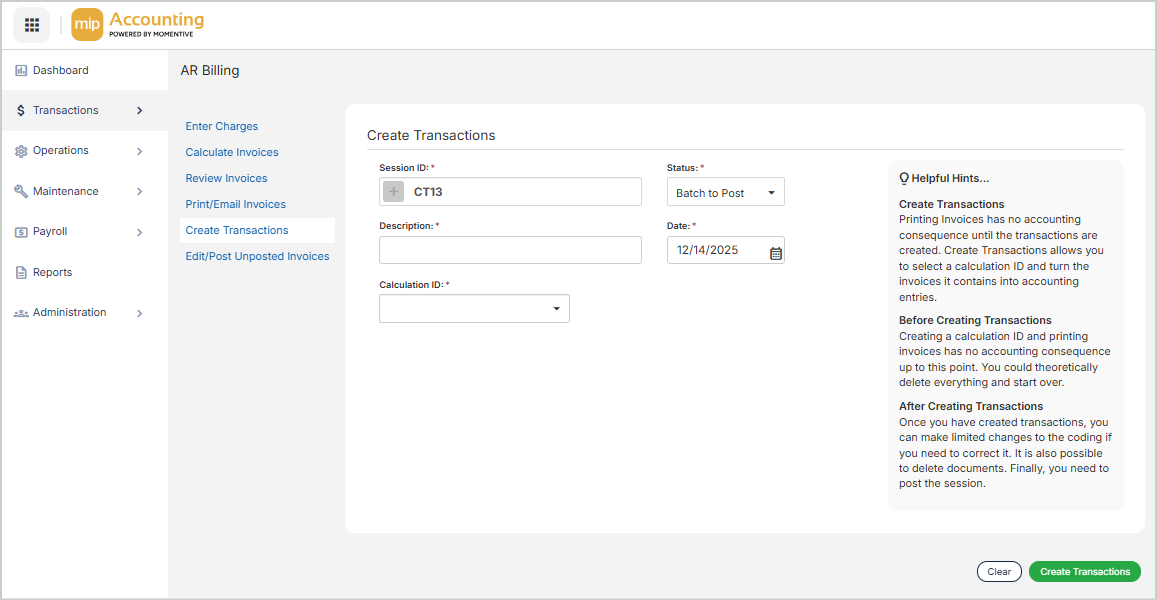
Create Transactions
Session ID: Enter a value for the session ID, or generate one automatically by selecting the + button.
Status: Select the session status - Batch to Post or Batch to Suspend.
-
This field will default to your organization's processing mode setting.
Description: Enter a description for the session.
Date: Enter a valid date for the session. The system defaults to today's date.
Calculation ID: Select a calculation ID from the drop-down list.
When you're finished, select Create Transactions. You can review your transactions on the next screen.
You can choose to keep creating transactions, review your unposted transactions, or you can immediately post your transaction entries to the general ledger.
